Zeroshell, if you haven’t heard of it yet, is a robust specialized Linux distribution for embedded routers and network gateways. It does: Routing Firewalling Proxying Wireless access point Captive portal VPN (virtual private network) Network authentication 802.1Q Virtual LAN DNS /DHCP Kerberos 5 authentication Time server And a lot more you can read all about […]


 Zeroshell, if you haven’t heard of it yet, is a robust specialized Linux distribution for embedded routers and network gateways. It does:
And a lot more you can read all about at Zeroshell.net. All of this is crammed into about a hundred-megabyte image. Zeroshell is not a modified version of an existing Linux distribution, but is built from scratch by its creator and maintainer, Fulvio Ricciardi.
Zeroshell is designed to run on small form-factor routerboards like PC Engines WRAP, Soekris, VIA, and Alix. It also runs from a CD, and you can install it to a hard drive. This is a good way to put older smaller hard drives back to work. The hard drive installation is a hack using the Compact Flash image, so it will take over your entire hard drive. Data, configurations, and logfiles go on a separate partition or a separate device, such as a USB drive.
Zeroshell includes FreeRADIUS, the popular network authentication server. RADIUS(Remote Authentication Dial-In User Service; despite the name, it works for all networking) authentication is a good way to control access to your network, both wired and wireless. It provides a central authentication server that can operate with any number of network access points. Zeroshell makes it easier to set up good strong wireless authentication with FreeRADIUS. I’m assuming you already have at least one working WAP on your network, and either bridging or routing in place so your wireless clients can access network resources, and you want to add some real security.
There are three parts to doing this: set up RADIUS, set up your access points to talk to RADIUS, then configure your wireless clients. Today we’ll do the first two, and then devote part 2 to Linux and Windows client configurations.
When you download Zeroshell, be sure to also download the Zeroshell HOWTO. An easy way to test Zeroshell and get familiar with it is to boot up the live CD on a PC on your LAN. You’ll need one free partition or a USB drive for data storage, and you’ll need at least two Ethernet interfaces: one LAN and one WAN. Zeroshell seems determined to use eth0 as the LAN interface, so after booting up you can find out which one the kernel calls eth0 and make sure it’s connected correctly. (Don’t do like I did and have only one interface connected- the wrong one.) Zeroshell uses a different naming convention and calls Ethernet interfaces ETH00, ETH01, and so forth.
The default IP address is 192.168.0.75, so if your LAN is on a different network there are a few different ways to connect to your Zeroshell box. Suppose your setup is like this:
        switch
   network 172.16.10.0
       ---------
       |       |
Zeroshell     Your PC
192.168.0.75  172.16.10.100
One way is to use the ipcommand to add a second address that’s on the same network as Zeroshell to your PC, like this:
# ip addr add dev eth1 192.168.0.76/24
Use ip addr show to verify. Now you should be able to ping back and forth with your Zeroshell box. Once you have connectivity open the Zeroshell Web control panel on your PC by entering its URL in a Web browser, like https://192.168.0.75. Your browser will warn you that the server certificate is bogus; ignore this and continue. Log in with admin, zeroshell.
Now that you’re there, follow the good instructions in the HOWTO for basic setup. Start with Setup -> Storage and create a data partition on a local hard drive or USB drive. 400-500 megabytes is plenty, especially if logging goes to a remote server. The New Database screen, as shown in Figure 1, determines your Kerberos realm name, LDAP root, and hostname. (Unless you enjoy being Example.com.) You can set a new login password as well, and assign a different IP address and default gateway.

Be sure to activate your new database by clicking the appropriate buttons. It will reboot, so you’ll have to log in again. Visit your Kerberos page to verify that the names are correct, and go to the LDAP page to activate LDAP.
Use ip addr del dev eth1 192.168.0.76/24to remove the extra address when you’re done with it.
It’s common to use RADIUS only for wireless users because of the indiscriminate manner in which wireless signals fling themselves about. I’ll use another fine bit of ASCII art to illustrate how it works:
User who wants in
  |
Wireless access point
  |
RADIUS server
The WAP becomes a NAS (network access server), so all it does is pass on authentication requests to the RADIUS server. Your WAPs must authenticate themselves to the RADIUS server.
There are two commonly-used types of RADIUS authentication: EAP-TLS (Extensible Authentication Protocol-Transport LayerSecurity), and EAP-TTLS (Extensible Authentication Protocol-Tunneled Transport Layer Security). EAP-TLS requires a PKI (public key infrastructure), which means the server and client authenticate to each other with encryption certificates. A unique encryption certificate must be distributed to each client. EAP-TTLS only requires the server to authenticate itself, then clients authenticate with passwords. We’re going to use EAP-TLS. It’s a bit more work to set up, but it’s more secure and easier to manage over the long run.
Continued on page 2
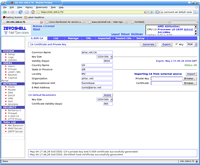
Now go to the Radius page. Enable the Radius server, then go to the Access Points tab and add an access point. The IP address of your access point must be in CIDR notation, for example 172.16.10.101/32. (The /32 netmask equals a single address.) Then create a strong shared secret with a maximum lengths of 32 characters
The configuration interfaces vary with every access point, but you always need the same information:
Come back for part 2 to learn how to set up your wireless clients to authenticate to your new RADIUS server.
Enterprise Networking Planet aims to educate and assist IT administrators in building strong network infrastructures for their enterprise companies. Enterprise Networking Planet contributors write about relevant and useful topics on the cutting edge of enterprise networking based on years of personal experience in the field.
Property of TechnologyAdvice. © 2025 TechnologyAdvice. All Rights Reserved
Advertiser Disclosure: Some of the products that appear on this site are from companies from which TechnologyAdvice receives compensation. This compensation may impact how and where products appear on this site including, for example, the order in which they appear. TechnologyAdvice does not include all companies or all types of products available in the marketplace.