



We’ve all see the Control Panel applet for Power Options: It lets you control a wide variety of power-related settings, such as when the system goes into standby mode, and how the system interacts with the UPS. Because you can control Windows 2000’s power management through a simple interface, it’s easy to miss what’s really going on. In this article, I’ll take you on a behind-the-scenes tour of Windows 2000’s power management capabilities.
Functions of Power Management Services
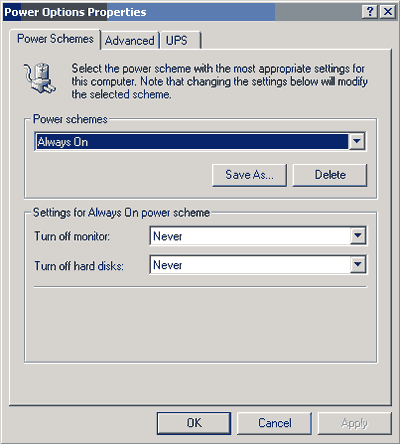
When you first glance at the Power Options applet, shown in Figure 1, you might assume that the Windows 2000 power management system is limited to turning the monitor and hard disks on and off, and putting the system to sleep. However, this isn’t the case.
 |
Besides interacting with the UPS (which is beyond the scope of this article), power management performs four critical functions (beyond the obvious):
- The power management services must be able to wake a sleeping system instantly. After all, putting the computer to sleep would be pointless if the user had to wait for a full boot sequence to complete during the wake up. It would be just as easy to have the user turn the system off. Instead, the user can simply press the power button, and the computer will instantly return the user to the point at which the computer went to sleep.
- The power management services must be able to respond to wake-up events. A wake-up event is some event the computer must be awake to handle. For example, suppose a computer has a fax modem, and someone tries to send a fax to that computer. The modem receiving the call could be a wake-up event. (This is a further illustration of why it’s important for a computer to wake instantly from a sleep state–if the computer takes a long time to wake up, the caller will hang up before the computer wakes up to receive the fax.) Other examples of wake-up events include running scheduled tasks such as virus scans or automatically downloading e-mail messages. Many computers also contain wake-on-LAN capabilities, which will wake the computer if it receives a packet from across the network.
- The power management services must be able to adjust software to changing power states. If a computer is going to sleep, it must be able to communicate that information to applications so that certain types of applications can stay semi-active, while others hibernate. For example, you don’t want your computer to wake up just because your word processor is set to do an auto-save every ten minutes. On the other hand, you don’t want the Task Scheduler to completely go to sleep if it has important tasks to perform. The power management services must know the differences between such programs and be able to interact with them accordingly.
- The power management services must be able to fully interact with the hardware. Various devices have different power requirements while in sleep mode, depending on what they do. For example, if your system uses a wake-on-LAN feature, the network card must retain some amount of power to provide that functionality. The Windows 2000 operating system must be able to interact with hardware devices to ensure that they have the proper amount of power for their current function. Not only must the operating system interact with the power needs of existing devices, but if you add devices to your system in the future, the power management services must also be able to interact with those new devices.
Regulating Power
The power management services have a lot of responsibility, and you may be wondering how they get the job done. Windows 2000 regulates power by complying fully with the Advanced Configuration and Power Interface (ACPI) standards used by most modern computer hardware. Windows 2000 implements this support through something called the On Now Power Management Design Initiative.
The basic premise of On Now is that when the operating system loads, all of the power management responsibilities are handed over to Windows 2000 from the computer’s BIOS (assuming the BIOS supports ACPI). All of the power management functions are still performed at the BIOS level; the only difference is that they are controlled by Windows rather than through the internal BIOS settings.
Once Windows has gained control of the computer’s power management functions, it decides which devices get what level of power through something called a power policy. A power policy is an internal setting that Windows builds based on the user preferences shown in Figure 1 and information collected about each hardware device in the system. The hardware devices inform Windows of their power requirements through their associated device drivers. For example, a modem might tell Windows its full power setting and how much power is needed for standby mode.
Because the applications and the hardware both interact so closely with Windows, Windows can make intelligent decisions about the power needs in particular situations. For example, Windows can make sure that the screen doesn’t turn off in the middle of a Power Point presentation.
As you can see, there is much more to managing a system’s power than meets the eye. The Windows 2000 power management services allow the hardware and software to work together to best meet the user’s power management needs. //
Brien M. Posey is an MCSE who works as a freelance writer. His past experience includes working as the director of information systems for a national chain of health care facilities and as a network engineer for the Department of Defense. Because of the extremely high volume of e-mail that Brien receives, it’s impossible for him to respond to every message, although he does read them all.